Overview:
Currently, any user can be added to or create a booking. Due to this, some users add test or vendor profiles in the system and misuse it to access higher-capacity cabs or other features.
To prevent this, a domain restriction has been implemented. It allows blocking specific known email domains, ensuring that users with those domains cannot create bookings
Config: "blockEmailsForBookingCreation": ["moveinsync.in"]
The config can be found in PMS (Property Management System) or Consul where misc (miscellaneous) is a general folder which can be accessed by anyone in MoveInSync.
Path: PMS/Consul → misc
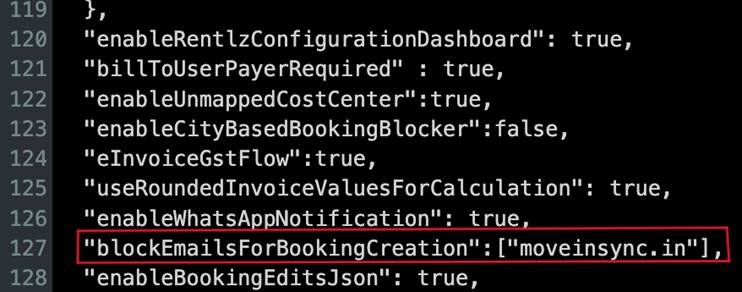
Image: Highlighting the block email domain config in PMS/Consul
Case Scenario:
Rohit, an employee of PwC, uses MoveInSync for employee commute bookings.Earlier, since the email domain restriction was not enabled, he was able to create bookings using his personal email ID (rohit@gmail.com), even though it was not part of the company’s configured domain.To address this, PwC required that all employees use only their official company email ID ( rohit@pwc.com) for bookings.This requirement is fulfilled by enabling the block email domain configuration, which restricts bookings from unauthorized or personal email domains and ensures that only approved corporate domains are allowed.
"blockEmailsForBookingCreation": ["gmail.com"]
Following message (Booking cannot be created) will be prompted to rohit on create booking dashboard while creating booking with un-authorized email domain:
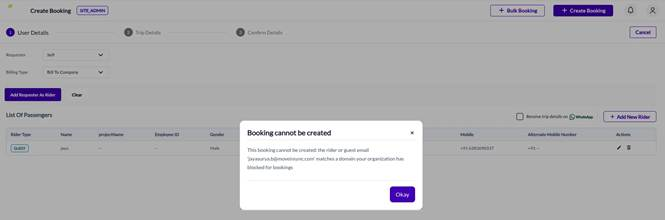
Note: Multiple email domains (using comma) can be blocked in one config only:
"blockEmailsForBookingCreation": [ "moveinsync.com", "gmail.com" ]
Was this article helpful?
That’s Great!
Thank you for your feedback
Sorry! We couldn't be helpful
Thank you for your feedback
Feedback sent
We appreciate your effort and will try to fix the article